a-blog cms のカスタムフィールドを紹介する動画
しばらく練習と思って作ってます。今日は「カスタムフィールドの紹介」を動画にしてアップしてみました。
a-blog cms のカスタムフィールドの大きな特徴として、カスタムフィールドの設定はブラウザ上から項目を作るのではなく、カスタムフィールドのフォームのHTMLを自分で作成しファイルを置く事で機能を追加する事ができるようになっています。
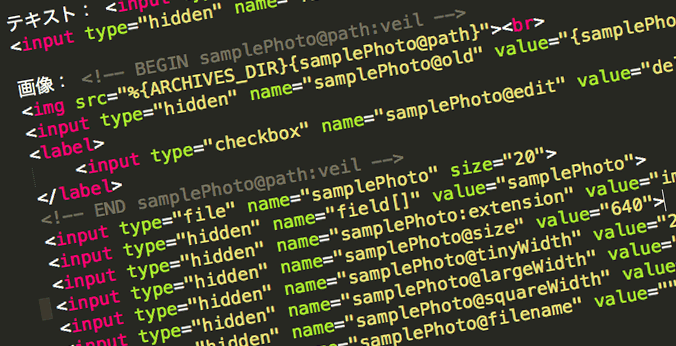
/themes/site2013/admin/entry/realestate.html に以下を追記しています。
テキスト: <input type="text" name="sampleText" value="{sampleText}">
<input type="hidden" name="field[]" value="sampleText">

画像: <!-- BEGIN samplePhoto@path:veil -->
<img src="%{ARCHIVES_DIR}{samplePhoto@path}"><br>
<input type="hidden" name="samplePhoto@old" value="{samplePhoto@path}" />
<label>
	<input type="checkbox" name="samplePhoto@edit" value="delete" />削除
</label>
<!-- END samplePhoto@path:veil -->
<input type="file" name="samplePhoto" size="20">
<input type="hidden" name="field[]" value="samplePhoto">
<input type="hidden" name="samplePhoto:extension" value="image">
<input type="hidden" name="samplePhoto@size" value="640">
<input type="hidden" name="samplePhoto@tinyWidth" value="280">
<input type="hidden" name="samplePhoto@largeWidth" value="1280">
<input type="hidden" name="samplePhoto@squareWidth" value="200">
<input type="hidden" name="samplePhoto@filename" value="">

この記事を書いた人
山本 一道
/
有限会社アップルップル
代表
名古屋のWeb制作会社 (有)アップルップル代表。HTMLファーストな国産CMS「a-blog cms」開発・販売・サポート / 名古屋のWeb制作者コミュニティ「WCAN」主催 / コワーキングスペース「ベースキャンプ名古屋」運営。Web制作の現場をより良くするための活動をしています。
@kazumich